
Loading
A Type Data
  • Home
  • Services
    • Request Data List
    • Data Appending Services
    • Direct Mail and Printing
  • Data Lists
    • Business Data Lists
    • Tax Lien Leads
    • Cell Phone Data Lists
    • First Time Home Buyers List
    • New Mover Data
  • Contact Us
  • Search

8 Incredibly Simple Ways to Get More People to Read Your Content

February 27, 2017/in Facebook Marketing, Writing Content /by Dave Carroll

Your precious words. You know they’ve got to be right to attract the audience you want.

You’ve slaved over them, carefully crafting each phrase. You finally hit “publish,” and what happens?

Nobody reads them. No comments, no tweets, no sharing on Facebook.

It’s enough to send a writer into deep depression and wipe out motivation to keep producing great content.

Think you need to spend another 10,000 hours perfecting your writing skills? Probably not.

Actually, the solution may be a lot easier than you expect. Writing less and styling your text so it’s easy to read could be all you need to do to attract and hold attention.

Impatient searchers

Jakob Nielsen’s seminal web usability study from 1997 showed that 79 percent of web users scan rather than read.

Think about how you use the web. You’re in search of information. And if you don’t find it on the page you’re visiting, you click away and look elsewhere.

The web is a “lean forward and participate” medium. Television, by contrast, is a “lean back and let it wash over me” medium.

What can you do to engage your readers so they lean into your content, stay on your pages, and interact with your information?

Make it snappy

To write successfully for the web, you need to forget some of what you learned in English composition class.

Accept that people scan web pages, rather than reading them in detail, and work with this reality rather than fighting it.

If you want to cover a complex topic, consider breaking it into a series of posts. It’s a great way to keep people coming back for more, and your reader will find it easier to digest your content if they get it in portion-controlled sizes.

Structure your paragraphs in the inverted pyramid style. This means stating your conclusion first, then supporting it with the sentences that follow. This helps scanners move from point to point and decide where they’d like to dive in deeper.

Once you’ve done that, use the following easy design techniques to make your content much more reader-friendly.

It takes just a few minutes to turn a post from an overwhelming mass of gray text to something that engages the reader and pulls her in.

1. Embrace the line break

There are few easier ways to make your content more readable. Even complex content can be made much more reader-friendly with the simple introduction of lots of white space.

Feature one idea per paragraph, and keep them short — three or four sentences at most.

And try writing some paragraphs with one sentence only.

2. Break up your content with compelling subheads

One technique taught here at Copyblogger is to write your headline and subheads first.

A strong headline (and therefore a strong premise) is vital to getting readers to check you out in the first place. And solid subheads keep readers engaged, acting as “mini headlines” to keep them moving through the rest of your content.

Make your subheads intriguing as well as informative. Web readers have well-honed BS meters, so don’t exaggerate or you’ll lose credibility. “Compelling” is not the same as “hypey.”

Once you’ve written your subheads, review them to see what readers/scanners will understand if they only read that part of your article. Is there a compelling story? Will they get the gist of your information?

3. Create bulleted lists

  • They create fascinations your readers can’t resist.
  • They’re an easily scannable way to present multiple points.
  • They look different from the rest of your text, so they provide a visual break for your reader.

4. Use “deep captions”

Studies have shown that image captions are consistently some of the most-read copy on a page. Try pairing a strong image with a “deep caption.”

Deep captions are two to three sentences long. That’s long enough to intrigue your reader to dig into your whole article.

5. Add relevant and helpful links

Internal links back to your own cornerstone content will keep people on your site and reading your best material.

External links demonstrate that you’ve researched the topic and want to highlight other experts. Good content uses both to expand your reader’s understanding and add value.

Another advantage of internal links is they make it less frustrating when some dirtbag scrapes your content (cuts and pastes it to their own site without attribution).

6. Highlight content strategically

Add emphasis to your content by bolding important concepts. You reader will be able to scan through and pick out the most important information at a glance.

Don’t highlight everything (which would have the same effect as highlighting nothing). Instead, emphasize the key points so the scanner can quickly pick them out.

7. Harness the power of numbers

Think those numbered list posts are tired? Think again.

Numbers are an incredibly effective way to both capture attention and keep the reader oriented.

If you don’t believe me, take a quick look at the “Popular Articles” on the right hand of this site. You’ll get a mini-tutorial in some of the ways you can use numbers (and other techniques) to make a post more inviting.

You can often make a post more compelling just by numbering your main points. Give it a try.

8. Check your formatting to turn scanners into readers

Once you’ve used subheads, numbers, bulleted lists, and other formatting to highlight the key elements of your post, read through it again — looking only at the text you’ve called special attention to.

Does the reader get the gist? Have you pulled out the most interesting and relevant words, the words that will pull your scanner in and turn her into a reader?

How about you? What are your favorite techniques for getting readers to lean in to your content? Let’s talk about it in the comments.
https://atypedata.com/wp-content/uploads/2016/07/socialmediarthr.png 768 1366 Dave Carroll https://atypedata.com/wp-content/uploads/2016/12/ATPE-WHITE-Logo.png Dave Carroll2017-02-27 22:07:522017-02-27 22:09:228 Incredibly Simple Ways to Get More People to Read Your Content

3 Reasons Why People Click Your Facebook Ads But You Still Don’t Get Leads

February 26, 2017/in Facebook Marketing /by Dave Carroll
You’ve spent hours building your Facebook Ads.You’re gettingClick, Likes, Comments, Shares….. But no Leads.

What gives?

Let’s quick go over the top 3 reasons why people click on your Facebook Ads, but don’t convert, and How To Fix Each Problem


1. Your Landing Page doesn’t use the same image/copy as your Ad


When a person clicks on your Ad, they have a general expectation of what they’re going to see when they are directed to your landing page. This expectation stems ENTIRELY from what you show them in the Ad. So if the Ad you show them on Facebook looks completely different than your landing page, you’re going to confuse people – confusion leads to drop-offs and a low conversion rate.

There are two things that you need to match up between your Facebook Ad and your landing page to minimize confusion as much as possible: imagery and copy.

Imagery

More than anything, I recommend using the same image on your landing page as you do in your Facebook Ad – just a larger version, of course. This can cause some issues for certain images, as the max pixel size of a right-side Facebook Ad is 100 x 72 px, while you’ll probably use dimensions upwards of 400 px for the image on your landing page. So you need to find an image that works in both sizes.

One other important piece to note is the color of the Ad image. Do your best to use the same color template in both the Ad and your landing page. This will make your landing page seem like a direct extension of your Ad, which will decrease confusion and mistrust in your visitors, causing them to convert more.

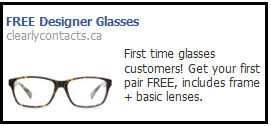
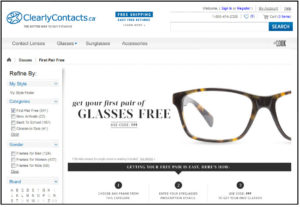
Check out a great example of this done right by Clearly Contacts. They used the same pair of glasses and white background on their Facebook Ad as they did on their landing page. They even used a similar blue for text on the landing page as the default blue Facebook uses for the Ad headline:

Facebook Ad

cc - fb ad

Landing Page

FB-Ad-Conversion-1

Copy

Now, to perfect the transition from Ad to landing page, it’s vital to use the same copy on both. Your Facebook Ad, especially if in the right-side column, will require much shorter text than you can utilize on your landing page. So for the Facebook Ad headline, I would recommend using a shortened version of the main title on your landing page.

For the example above, Clearly Contacts made a major mistake in that they used the word “Designer” to describe its glasses on the Facebook Ad, but not on the landing page. This will lead to confusion and mistrust in the visitor. They may think that they fell victim to a bait-and-switch: that they were promised “Designer” glasses, but the Free Offer is actually only for generic knock-offs. Even if this is not the case, it could be perceived this way. And perception is key on your landing page.

I would also add the text from the Facebook Ad to the landing page that reads “includes frames + basic lenses”. A pair of glasses needs both, so a person buying them will want to know whether this offer includes both or not. Leaving it off the page leads to ambiguity, which will lead to drop-off.

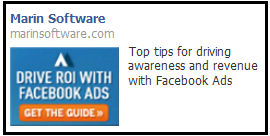
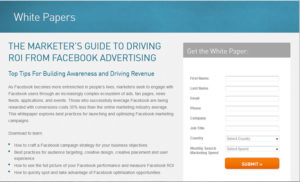
One more element of the copy that NEEDS to match between the Ad and the landing page is the call-to-action. If your Ad’s call-to-action is “Get the Free Ebook”, it should be the exact same on the landing page. Here is an example from Marin Software on the WRONG way to do it. On the Ad their call-to-action (in the image) is “GET THE GUIDE”, while on the landing page it’s “SUBMIT”.

It’s actually quite unfortunate that they flubbed this part, because they did a perfect job of using the same button style and color on both the Ad and the landing page, going so far as to include the same “>>” on both. This makes it perfectly obvious to the user coming from the Ad that the orange button on the landing page is the right one to click.

Check out the example for yourself below:

Facebook Ad

MS - FB Ad

Landing Page

FB-Ad-Conversion-2


2. Your Landing Page Is Taking Too long to Load


Just as the copy and imagery of your landing page are important, the speed at which it loads is just as important. The longer it takes your landing page to load, the lower your conversion rate will be. That’s a fact. Studies by Amazon have shown that a page load slowdown of just one second could cost it $1.6 billion in sales each year. For Google, slowing its search results by just four tenths of a second they could lose 8 million searches per day.

These examples magnify the results of slow webpages quite a bit – but even if your business is much smaller than Amazon and Google, slow load speeds on your landing pages will hurt you a lot.

To alleviate this pain, let’s take a look at a few things that may be causing your page to load slowly and how to alleviate them.

Tips to Decrease the Load Time of your Landing Pages

1. Decrease the number of images: Images are incredibly “heavy” (meaning they take a long time to load). Whereas text and the page’s background color are extremely light. So if you see that you are using a lot of images to help explain the points of your landing page, try to replace them as much as possible with description text. And if you need them to stand out, use a different font or background color instead of an image.

2. Lower the file sizes of your images: When you’ve narrowed down the number of images to an absolute minimum, you can look at decreasing their file sizes. This can be done in two ways, either by decreasing the dimensions of the image or decreasing the quality.

3. Move all Javascript below the tag: If you have any pop-up windows, analytics tracking codes or fancy animations on your landing page, then you have Javascript. Similar to images, Javascript is heavy. So what can you do to alleviate the load? Move it to the very bottom of the landing page, below the tag. This will allow your server to load the visual elements of your landing page first, so visitors can quickly begin viewing the page, while the tracking codes and pop-ups, that users either don’t interact with or interact with after reading the page, load in the background.


3. Too Many Form Fields


A large form can be daunting to even the most interested person. Especially if the form fields in it ask them questions that they need to think about before answering. Asking a person for their first name is one thing, but asking for their favorite brand of running shoes will require them to stop and think. This is exactly what you DON’T want to make a person do. Any student of UX design will be familiar with Steve Krug’s book “Don’t Make Me Think!”. This is a concept you should always keep in mind when designing any marketing material that you want a person to read or interact with.

So what is the right amount of form fields to have?

Well, that depends on the requirements of your sales or marketing teams. If your sales team absolutely needs to know certain things, such as industry and marketing budget to accurately prepare for a product demonstration, then you need to ask for it. Or if your marketing team’s email marketing automation campaigns need to have personalized merge tags for the company name and address, then you need to ask for it.

Just don’t add in anything that doesn’t NEED to be there. When someone on your team asks for a field to be added to your form, make sure it is 100% necessary before you add it. Unless you’re going to use it in an automated email, you don’t need to ask for a person’s last name. Unless your sales team plans to call every lead that you get from your landing pages, you don’t need to ask for a phone number.

It’s important to realize that not every form on every landing page needs to ask the same things. Only some fields are relevant. This depends a lot on where this batch of leads is in the sales cycle. If it will be the first time they are interacting with your company, and they just want to download an ebook you’re offering, you don’t need to care about any sales information. Because at this point they are unlikely to respond well to any kind of sales call or message from your company. So you can save those fields for future landing pages.

Article provided by Wishpond
https://atypedata.com/wp-content/uploads/2016/07/socialmediarthr.png 768 1366 Dave Carroll https://atypedata.com/wp-content/uploads/2016/12/ATPE-WHITE-Logo.png Dave Carroll2017-02-26 22:36:232017-02-26 23:08:123 Reasons Why People Click Your Facebook Ads But You Still Don't Get Leads

10 Best Free Stock-Photo Sites For Social Media Ads

February 6, 2017/in Facebook Marketing /by Dave Carroll

If you manage ad campaigns on your own without the help of a Facebook advertising agency, then you know the difficulties of obtaining HD creatives. To obtain original HD creatives, you will need to either hire a graphic designer and photographer or purchase licensed photos online (unless you can photograph and edit photos, in which case, that will be more time consuming for you).

Of course, there are easier, cost-free ways of obtaining photos for your ads by searching for images on Google. However, this method can be costly to you because, although those photos are accessible and downloadable online, you can’t legally use many of them. This means if you downloaded a photo online that a photographer or graphic designer has full rights to, the person who has the full rights can sue you for copyright infringement or plagiarism.

Fortunately, you can avoid this predicament by downloading free stock photos instead. Stock photos are professional, high-quality images of common places, landmarks, nature events, or people. The list provided below are free stock photos, photos that are licensed under the Creative Common Zero, or CC0. Photos licensed under CC0 can be used for any legal purpose. These photos, which you can edit, copy, and distribute, are free for personal and professional use without the need for attribution (asking for permission from the photographer or giving credit to the source).

The list below contains the 10 best free stock photo websites that exist online. These are the best websites because of the following criteria they met:

  • quality of photos
  • ease of search
  • diversity of photo collections
  • the size of photo gallery

From among the plethora of other stock photo sites, these are the 10 best.

1. Unsplash

Unsplash contains free, HD photos, from images of couples to nature to workplace, Unsplash has it all. Not a single low quality photo exists in its gallery.

2. Pexels

Currently, Pexels contains over 25,000 free stock photos and releases 3,000 new ones every month. All photos are hand-picked from photos uploaded by Pexels’ users or sourced from free image websites.

All of Pexels’ images are under the CC0 license—they’re free to use. However, the site creators ask that you don’t portray identifiable people in the images in a negative or offensive light without their consent.

3. Pixabay

Pixabay currently contains over 850,000 free stock photos, art illustrations, videos, and vectors. All of Pixabay’s photos can be depicted on social media sites, including Facebook. Note, however, that some of the photos here are photos sponsored by Shutterstock. These photos, which are still free to use, are watermarked with Shutterstock’s logo.

4. Stocksnap

Stocksnap adds hundreds of stock photos weekly, photos which are free from copyright restrictions. When searching, you can sort the images by trending, date, views, downloads, and favorites, making it easier for you to find the image that you need.

5. Negative Space

Negative space provides HD stock photos for free. Hundreds of new images are added each week.

6. MMT Stock

MMT photo categories include flowers, New York City, Macro, Workspace, Technology, Landscapes, Sunset, Textures, among numerous others. Although you don’t need attribution to use these images, it is always appreciated to credit the source. MMT, founded by Jeffrey Betts, has been featured in Canva and Shopify.

7. Life of Pix

Although Life of Pix contains hundreds of free photos for you to use, note that some of these photos are sponsored by Adobe Stock. Adobe Stock photos are still free to use; however, they are watermarked with the brand’s logo.

8. Picjumbo

When using Picjumbo’s images, consider adding attribution or linking back to Picjumbo’s website as it is greatly appreciated by the owner. Adding attribution is, of course, optional.

9. Free Stocks

Although all photos are free for personal and commercial use, when using Free Stocks’ photos, remember to respect registered trademarks and intellectual and private property. Your are not allowed to redistribute these photos to other free stock photo websites (such as the websites listed in this article).

10. Gratisography

https://atypedata.com/wp-content/uploads/2017/02/good-camera-ftr.jpg 775 1240 Dave Carroll https://atypedata.com/wp-content/uploads/2016/12/ATPE-WHITE-Logo.png Dave Carroll2017-02-06 18:33:022017-02-12 02:05:1910 Best Free Stock-Photo Sites For Social Media Ads

8 Tips on Creating The PERFECT Facebook Post

February 6, 2017/in Facebook Marketing /by Dave Carroll

We can all agree…..Social media is a great way to promote your business.

For example, you can promote your blog posts, guides, and other content on social media to drive people to your website, consequently acquainting them to your brand and, hopefully, swaying them to become a loyal customer.

However, crafting the right post requires some skill. Some social media practices are better than others.

In fact, some social media practices harm your social media campaigns.

For example, did you know that using hashtags on Facebook is a grave fault? Did you know that posting stock photos on Facebook reduces your reach?

1. Avoid Hashtags


Using hashtags (#) and @ symbols on your Facebook posts will decrease your reach to approximately six percent of total fans. Facebook will penalize you for using these symbols because they’re often used in other social media platforms such as Twitter, one of Facebook’s competitors. Additionally, posts with hashtags and @ symbols indicate that they’re not original Facebook posts, that they likely exist in other social networks (which is what usually happens when you write one post for several social networks using a social media management system like Hootsuite). Because Facebook doesn’t want users to advertise other social media networks on its platform, it will penalize you by reducing your reach.

If you’re using scheduling services such as Hootsuite or MeetEdgar for your social media posts, make sure to write separate copies for each social network. For example, include hashtags and @ symbols on your Twitter copies (these symbols work well on Twitter) and create a different version without the hashtags and @ symbols on your Facebook posts.

2. Post Moderately

The more is sometimes not the merrier. This is especially true for Facebook posts. In the eyes of Facebook, posting often equals lesser quality posts. Facebook doesn’t reward frequency—it rewards engagement numbers. For example, posts with high engagement will rank high in its algorithm, resulting in a top spot on its news feed and higher reach. Inversely, posts with low engagement will have lower reach. Thus, it’s better to have fewer high-quality posts than numerous low-quality posts that don’t accrue engagement.

Posting moderately also avoids spammy posts. If you post often enough that your followers will perceive your efforts as spam, they can easily hide your posts or, worse, report it as spam. Once users do the latter action, Facebook reduces your page’s ranking.

3. Use Emojis (If Appropriate) ✍️👌

Statistics show that social media posts with emojis have higher engagement than social media posts without emojis. It has been found that emojis increase comments and shares by 33% and likes by 55%. Additionally, in an experiment by AdEspresso, the Facebook marketing partner found that ads with emojis performed better than ads without emojis. With these promising findings, perhaps it’s time that you add emojis to your copies. However, only use emojis if it’s appropriate for your brand’s image and for your post’s tone. Also, make sure to study your analytics (if you have access to it) to see if your posts with emojis do perform better than your posts without emojis. Some tactics may work for some and not for others.

4. Include a Photo in Your Posts

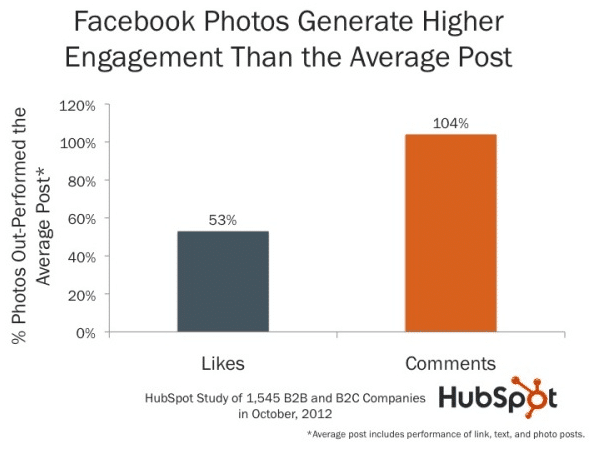
Statistics also show that posts with photos receive more engagement than posts without photos. According to Kissmetrics, posts with photos receive 53% more likes, 104% more comments, and 84% more click-throughs. It’s not hard to imagine why posts with more photos perform better: photos attract the audience’s eye and causes them to pause mid-scroll.

If you want to increase your reach with posts like these, upload photos that have never been uploaded to Facebook before, photos that are completely original, that don’t exist anywhere else (yes, that means no stock photos you find on the internet). This is important because Facebook checks the .EXIF data on your photo and rewards posts with original photos.

5. Write Shorter Posts

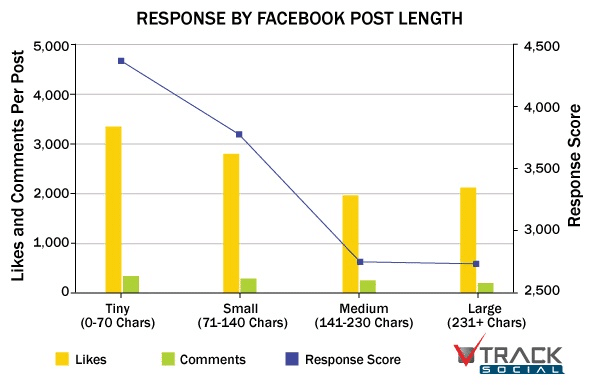
Shorter posts also receive more engagement. Statistics show that Facebook posts below 250 characters have 60% more engagement. If you reduce your copy to 80 characters or below, you can increase your engagement by another 66%.

It’s easy to imagine why shorter posts prevail. People on the internet (especially those on mobile who are on-the-go) are usually impatient and expect to consume information quickly and easily. If your posts are long, especially if they are long enough to be truncated, followers will unlikely read your posts through its entirety (if they will even read your post at all).

6. Post Valuable Content

If you’re a business and you’re managing your social media, think of your posts as answers to the question, “What’s in it for me.” Thus, post content that is valuable to your followers. For example, if you’re in the entertainment business, post content that entertains. This may be a funny article, an entertaining video, or a culturally relevant meme. If you’re in the marketing business, post content that are helpful to your followers, like certain posts on your blogs, guides, infographics, or other helpful resources.

7. Include CTAs in Your Post

As mentioned in point number two, posts with low engagement will have lower reach. If pages consistently have low engagement, it will receive a low ranking by Facebook, consequently lowering its chances of getting the top spot on the news feed. To increase your engagement, you can combine tactics number three, four, five, and six listed in this post. However, you can also increase your engagement by adding a CTA (call-to-action) on your copy. CTAs let followers know what you want them to do after reading your post. For example, you can ask them to comment on your post, like, or share to friends. Adding a CTA to your copies can improve your engagement. After all, the age old adage sometimes rings true: ask and thou shalt receive.

8. Post at the Right Time

It’s important that you post at a time when your followers are online and your competition is low. To know the best times to post on Facebook, consult your insights (if you have access to this) and compare your data. For example, data may show that your posts have a higher engagement at 1 p.m. on the weekdays. It may also show that views spike on the weekends at 10 p.m. You can also try creating a poll that asks followers which times of the day they are most often browsing on Facebook. Although the best times to post can only be known by analyzing your insights, some social media experts like Vincent Dignan advise on posting three times a day: in the morning, in the afternoon, and in the evening.

Running a social media campaign requires skill and effective tactics. When posting on Facebook, it’s important that you avoid hashtags, post moderately, liven your copies with emojis if appropriate, include original photos, write shorter copy, include CTAs on your post, and post at the right time. If you want to improve your social media campaign, use one, two, three, or all of the advice listed in this post. You now have valuable social media knowledge. It’s time to use it.

https://atypedata.com/wp-content/uploads/2017/02/rthdrfcht.jpg 354 708 Dave Carroll https://atypedata.com/wp-content/uploads/2016/12/ATPE-WHITE-Logo.png Dave Carroll2017-02-06 18:21:112017-02-07 07:17:458 Tips on Creating The PERFECT Facebook Post

5 Elements Of Any Good Landing Page

February 6, 2017/in Facebook Marketing /by Dave Carroll

Whether we’re talking about a lead generation page for your consulting agency, or an eCommerce product, it all starts with getting the ‘essential ingredients’ together to give your landing page the best chance at success.

1. Page Design

First and foremost, is distraction-free design. As previously discussed, people are visiting this page for a reason. So keep it at that! Have one primary goal, and one primary message on the page, without a lot of extra elements that distract people from signing up on your form or hitting the Purchase button.

Removing menu links and navigation help to focus the user on the most important page elements by reducing the options they can take. The principle is driven home in the classic usability book Don’t Make Me Think, which proves time and again that the best usability tips for website visitors is to reduce confusion in favor of simplicity. While in some cases it’s fine to add another link or two, the point is to try and keep things as straightforward as possible by limiting available options.


2. Headlines and Value Propositions

Headlines are really concise value propositions in disguise. The idea is to boil down what your product or service offers with a simple, straightforward message—one that focuses your main benefits or differentiates your selling points.

Another way to create this is to think about what people get from your product or service. That means the outcomes or end-results, which can be perfectly summarized with a case study or testimonial where a happy customer helps prove your case for you.

3. Images and Video

Your ‘hero’ image or video is just that: it expands on the value proposition by showing what the visitor could get or look like with your product or solution.

Think about some of the best commercials, like a Nike one, where the person is running up flights of stairs and seemingly conquering all evil. Incorporating compelling images and inspirational videos also help make the intangible concrete for your visitors. It’s not always easy to explain, in written text alone, how your services benefit people. But a simple story (similar to many explainer videos) can help crystalize exactly what you do, and why your solution is so valuable.

Launch - Startup Landing Page Theme

4. Calls-to-Action

Calls-to-Action should be big, obvious, and compelling. Sticking with the theme of reducing cognitive stress, it should be immediately obvious to everyone what they’re supposed to fill out or where they’re supposed to click.

One of the important, yet often overlooked, aspects here is how you use design to help differentiate between multiple CTA’s on a page. For example, the ‘primary’ action you want someone to take should be more noticeable and emphasized on a page, while a ‘secondary’ action can be deemphasized with placement or maybe a text link (as opposed to a big button).

5. Credibility Indicators

You know that what you offer has value. But how do other people know that?

The best way is to use third party validation, so that you’re not just making the same baseless claims as the rest of your competition.

That means incorporating customer testimonials that illustrate the benefits customers have seen, logos of prestigious clients you’ve worked with, awards that you’ve won or press that has lauded your work, or case studies that show a certain percentage improvement other clients have gained. You can even use the corporate locations and number of customers you have as a way to demonstrate that your operation is first class.

https://atypedata.com/wp-content/uploads/2016/12/ATPE-WHITE-Logo.png 0 0 Dave Carroll https://atypedata.com/wp-content/uploads/2016/12/ATPE-WHITE-Logo.png Dave Carroll2017-02-06 18:19:322017-02-06 18:19:325 Elements Of Any Good Landing Page

Why you DONT use income targeting for marketing

February 6, 2017/in Facebook Marketing /by Dave Carroll

A Better Alternative to Income for Advertising

retgsegrhsredgxdergh

Income can be a viable marketing tool but when advertisers use it to predict household spend it often falls flat, producing less than desirable results and leaving marketers frustrated. So what is the alternative that helps advertisers and marketers achieve greater flexibility and precision?

The analytical team at AnalyticsIQ took this challenge head on. Research and experience indicated there are two primary reasons for the misfire with household income:

  1. Analytics prove that higher income households don’t always spend at a high rate. For example, the wealthiest 14% of US households are actually in the lowest 10% of spend while 16.5% of the least affluent households are in the highest 25% of spend. Using predicted or actual income alone does not necessarily identify the best revenue-producing customers.

     2. Traditional income predictors do not take into consideration predicted savings. By addressing savings, greater clarity is available to the actual dollars available for discretionary household spend.

So What About Segment Spend?

Another challenge marketers face is the ability to get granular and predict the amount of available spend within a specific market segment. It stands to reason that a generic spend predictor will perform differently for travel than it will for apparel or home furnishings. This is where segment spend prediction by industry type comes in. By segmenting spend prediction into 14 industry sub categories, marketers and advertisers achieve new levels of precision and dramatically improves campaign results.

An example?

A large retail drugstore chain wanted to improve wallet share with their 50MM+ consumers. Spendex was used to identify expected health and beauty spend and target those under-performing customers with appropriate offers. The result – a significant increase in customer spend and wallet share.

Don’t waste precious resources chasing bad prospects. Consider category spend prediction as a viable option to improve your marketing results.

https://atypedata.com/wp-content/uploads/2016/12/ATPE-WHITE-Logo.png 0 0 Dave Carroll https://atypedata.com/wp-content/uploads/2016/12/ATPE-WHITE-Logo.png Dave Carroll2017-02-06 18:16:122017-02-06 18:16:12Why you DONT use income targeting for marketing

7 Step Tax Resolution Client Daily Checklist

November 5, 2016/in Tax Professional /by Dave Carroll
Read more →
https://atypedata.com/wp-content/uploads/2016/12/ATPE-WHITE-Logo.png 0 0 Dave Carroll https://atypedata.com/wp-content/uploads/2016/12/ATPE-WHITE-Logo.png Dave Carroll2016-11-05 13:09:282016-11-06 03:53:287 Step Tax Resolution Client Daily Checklist

Tax Lien Free Download

November 1, 2016/in Uncategorized /by Dave Carroll
Read more →
https://atypedata.com/wp-content/uploads/2016/12/ATPE-WHITE-Logo.png 0 0 Dave Carroll https://atypedata.com/wp-content/uploads/2016/12/ATPE-WHITE-Logo.png Dave Carroll2016-11-01 18:30:432016-11-04 17:03:39Tax Lien Free Download

Tax Lien Leads- Tax Lien Records

October 30, 2016/in Uncategorized /by Dave Carroll
Read more →
https://atypedata.com/wp-content/uploads/2016/12/ATPE-WHITE-Logo.png 0 0 Dave Carroll https://atypedata.com/wp-content/uploads/2016/12/ATPE-WHITE-Logo.png Dave Carroll2016-10-30 19:55:392016-11-01 18:24:29Tax Lien Leads- Tax Lien Records

Wage Garnishment Help

October 21, 2016/in Wage Garnishment Info /by Dave Carroll
Read more →
https://atypedata.com/wp-content/uploads/2016/12/ATPE-WHITE-Logo.png 0 0 Dave Carroll https://atypedata.com/wp-content/uploads/2016/12/ATPE-WHITE-Logo.png Dave Carroll2016-10-21 07:38:302016-10-21 07:38:30Wage Garnishment Help
Page 1 of 212

Recent Posts

  • 8 Incredibly Simple Ways to Get More People to Read Your Content
  • 3 Reasons Why People Click Your Facebook Ads But You Still Don’t Get Leads
  • 10 Best Free Stock-Photo Sites For Social Media Ads
  • 8 Tips on Creating The PERFECT Facebook Post
  • 5 Elements Of Any Good Landing Page

Categories

  • Facebook Marketing
  • Tax Professional
  • Uncategorized
  • Wage Garnishment Info
  • Writing Content

A Type Data

Advertise hereAdvertise here
Scroll to top